
15. Waivers
Requesting, approving and rejecting a waiver on an invoice.
What a waiver is
A waiver writes off part or all of what a flat owes on one invoice: a penalty forgiven, a disputed charge dropped, a concession agreed by the committee. It is a two-step process so that no one person can write off dues alone: one person requests, and an approver (the Superadmin, a Manager, or staff with the Waivers — Approve/Reject permission) approves or rejects.
A waiver does not change the invoice's charges. The total stays as billed, the waived amount is recorded beside it, and the balance due goes down.
Who can request and who can approve
| Person | Request | Approve or reject |
|---|---|---|
| Superadmin, Manager | Yes, always. | Yes. |
| Other staff | Only when their role has the Waivers permission with Add, and Fee Waiver Requests is switched on. | No. This cannot be granted through a role. |
| Residents | No. | No. |
- A resident who wants a waiver asks the society office, and a member of staff raises the request on the resident's invoice.
- The Waiver tab sits beside the Payment and Cancel tabs on the invoice page, but reaching the invoice page only needs ordinary invoice access — the tab itself appears purely on the Waivers permission (or being Superadmin/Manager). Record Payment is a separate permission and is not required to raise a waiver.
- If the Platform Admin has switched Waivers off for the society, the tab, the approval panel and the history are all hidden, for everyone.
Requesting a waiver
- Open Invoices and open the invoice.
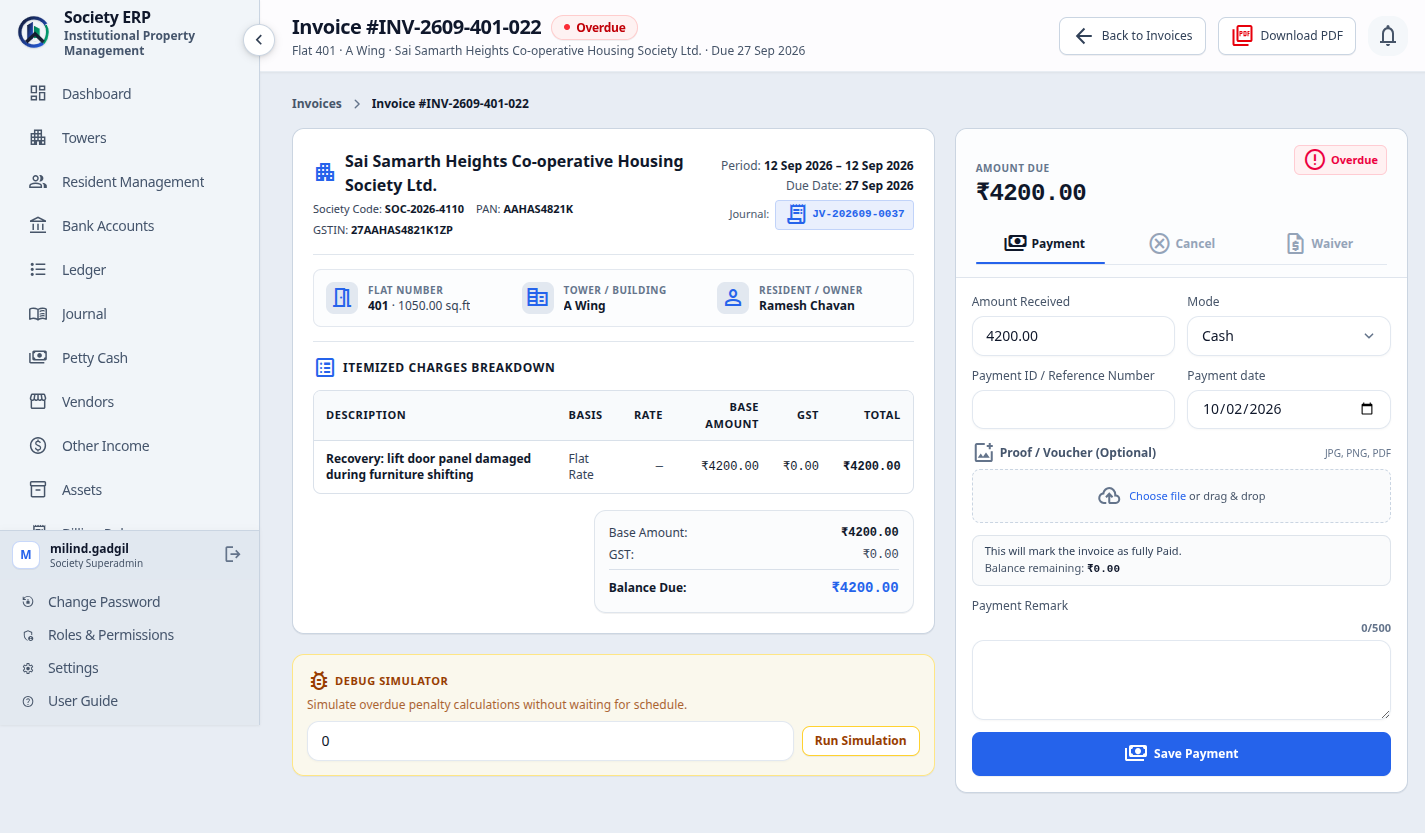
- In the panel on the right, click the Waiver tab.
- Enter the Amount to Waive.
- Enter the Reason for Waiver.
- Click Submit Waiver Request .
| Field | Meaning |
|---|---|
| Amount to Waive | Required. More than zero and not more than the invoice's balance due. |
| Reason for Waiver | Required, up to 500 characters. It stays on the invoice and appears in the Waiver Register, so write it for someone reading it a year from now. |
The invoice then shows Waiver Pending Approval with the amount, the reason, who asked and when. Nothing about the balance changes yet.
- An invoice can have only one pending request. The Waiver tab disappears until that request is decided.
- A waiver cannot be requested on a Paid or Cancelled invoice, or while the invoice is Processing a cheque or bank transfer.
- A request cannot be edited or withdrawn. If it is wrong, have it rejected and raise a new one.
Approving or rejecting
The Waiver Approval panel on an invoice with a pending request is shown to the Superadmin, Managers, and staff whose role has the Waivers — Approve/Reject permission.
- Open the invoice and read the request under Waiver Pending Approval.
- In the Waiver Approval panel, enter a Remark. It is optional when approving and required when rejecting.
- Click Approve or Reject .
| Approve | The waiver takes effect at once, is posted to the ledger, and the flat's residents are notified. |
| Reject | Nothing changes on the invoice. The request moves to Waiver History with your remark, and a new request can be raised. |
Decided requests are listed under Waiver History on the invoice: Approved or Rejected, the amount, the reason, the remark, who requested and who decided, and the date.
An approval cannot be reversed
There is no button to undo an approved waiver. Read the amount and the reason before you approve.What an approved waiver does
| Invoice total | Unchanged. The bill still shows what was charged. |
| Waived | Increased by the waiver amount and shown as a deduction in the invoice summary. |
| Balance Due | Reduced by the waiver amount. Balance Due = total − paid − waived. |
| Status | Becomes Paid if nothing is left to pay. If a balance remains it becomes Partially Paid, and the list adds a Partially Waived badge. An invoice settled by waiver alone reads Fully Waived on its page and Waived in the list. |
| Ledger | A voucher debits Waivers & Discounts Allowed (an expense) and credits Unit Receivables, so the flat owes less and the society's books show the concession as a cost. |
- Example. An invoice of ₹2,950.00 has ₹1,000.00 paid. A waiver of ₹450.00 is approved. The total stays ₹2,950.00, Waived shows ₹450.00, and the balance due falls from ₹1,950.00 to ₹1,500.00.
- If a payment was recorded between the request and the decision and the waiver is now larger than the balance, approval is refused. Reject the request and raise one for the right amount.
- On an overdue invoice with a balance left after the waiver, the nightly check returns it to Overdue and the penalty continues on the rule's terms.
- The Waiver Register report lists the society's waivers for a period (chapter 21). To find waived invoices quickly, filter the invoice list by Waived.
The two switches in Billing Configuration
| Fee Waiver Requests | On: staff with the Waivers permission can raise requests. Off: only the Superadmin and Manager can raise them. Approval is unaffected either way. The description on screen mentions residents; residents cannot raise a request in either position. |
| Always Show Waiver Approve/Reject Controls | Ticked: approvers see the Waiver Approval panel on every invoice; while nothing is pending it says so and has no buttons. Unticked: the panel appears only on an invoice with a pending request. |
Change either switch under Settings , Billing Configuration , then Save Configuration .
Open Billing Configuration arrow_forwardCommon problems
- There is no Waiver tab: the invoice is Paid, Cancelled or Processing; it already has a pending request; your role lacks the Waivers permission; Fee Waiver Requests is off and you are not the Superadmin or Manager; or Waivers is switched off for the society.
- "Fee waiver requests are disabled for this society": Fee Waiver Requests is off. The Superadmin or Manager can raise the request, or switch it on.
- "Waiver amount cannot exceed the outstanding balance": lower the amount to the balance due or less.
- "This invoice already has a pending waiver request": have the pending one approved or rejected first.
- "Cannot approve: waiver amount exceeds the current outstanding balance": the balance fell after the request was made. Reject it and raise a new one.
- "A remark explaining the rejection is required": enter the Remark before clicking Reject.
- A staff member cannot see the Waiver Approval panel: their role lacks the Waivers — Approve/Reject permission. The Superadmin and Manager can always approve; other staff need that switch turned on in their role.